Sweet Honey 3D Text Effect – A Creative Designer’s Best Friend
What Is the Sweet Honey 3D Text Effect?
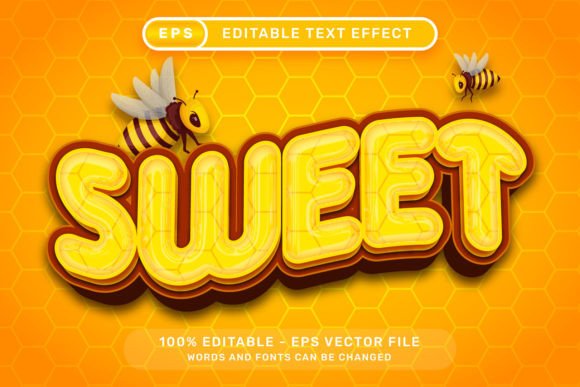
The Sweet Honey 3D Text Effect is a ready-to-use Adobe Illustrator EPS file that lets designers instantly apply a rich, dimensional honey-themed text style to their projects. It includes editable text layers, so you can simply select your text, change the font or wording, and watch it transform into a vibrant 3D honey text effect. No plugins, actions, or additional textures are required — everything is built right in. The package also comes with a high-resolution 7000 x 4000px .jpg preview and a graphic style panel setup under Window – Graphic Styles, making it an incredibly user-friendly resource.
Where Can You Use the Sweet Honey 3D Text Effect?
Whether you're designing for print, digital media, or social platforms, the Sweet Honey 3D Text Effect adapts beautifully across a variety of creative applications. Here are some real-world situations where this effect can make a big visual impact:
- Birthday Invitations: Especially for kids' parties or bee-themed celebrations, this text effect adds a playful and colorful touch that stands out.
- Marketing Materials: Promotional banners, flyers, or posters for honey-based products, bakeries, or natural food brands can benefit from the warm, inviting glow of honey-textured typography.
- Social Media Graphics: Eye-catching Instagram stories, Facebook posts, or Pinterest pins for food bloggers or lifestyle brands can be elevated with this effect.
- Logo Concepts: If you're working on a logo for a local honey shop, a café, or a natural skincare line, this effect can serve as a foundation or inspiration for a custom 3D wordmark.
- Wedding or Baby Shower Designs: The ribbon bows, balloons, and bee illustrations included in the design make it perfect for celebratory designs where whimsy and warmth are key.
Who Benefits Most from This Text Effect?
The Sweet Honey 3D Text Effect is especially useful for:
- Freelance Designers: Looking to speed up their workflow while maintaining high-quality visuals, especially for clients in the food, wellness, or event planning industries.
- Small Business Owners: Who want to create professional-looking promotional materials without hiring a designer. With just a few clicks, they can turn plain text into something visually engaging.
- Content Creators: Influencers, YouTubers, and bloggers who need consistent, on-brand visuals for their platforms. This effect can be used across thumbnails, headers, and quote graphics.
- Event Planners: Who need to design custom invitations, signage, or décor elements for themed parties or baby showers.
Designing with Sweet Honey 3D Text Effect – Practical Tips
While the Sweet Honey 3D Text Effect is easy to use, there are a few things to consider before diving in:
- Font Choice Matters: Not all fonts work equally well with 3D effects. Choose fonts with strong, clean lines to ensure the honey texture and depth come through clearly.
- Color Adjustments: The default honey color is warm and golden, but you can tweak it to match your brand palette. Illustrator allows full color editing of the graphic style.
- Layer Management: The file includes multiple layers for the bee illustration, balloons, and bows. You can toggle these on or off depending on your project’s theme or space constraints.
- Exporting for Different Platforms: For digital use, make sure to export at the correct resolution. The high-res .jpg preview is great for quick placement, but for editing, always work in the native .EPS file.
Why It Stands Out from Other 3D Text Effects
Many 3D text effects rely on complex layering, textures, or Photoshop actions. The Sweet Honey 3D Text Effect keeps it simple — it’s all vector-based and works directly in Adobe Illustrator’s Graphic Styles panel. This means:
- No waiting for plugins to load or render.
- Full scalability without quality loss.
- Easy editing of colors, shapes, and layout.
- Included bee, balloon, and bow illustrations that complement the theme.
Industries That Can Leverage This Design Tool
While the honey theme is specific, the Sweet Honey 3D Text Effect has broader appeal across several niches:
- Food & Beverage: From honey jars to bakery packaging, this effect adds a rich, appetizing texture to product labels and branding.
- Retail & E-commerce: Online stores selling natural or handmade goods can use this effect in banners, product images, and sale announcements.
- Education & Kids’ Content: Teachers or creators of educational materials can use the bee illustrations and playful fonts to make learning more engaging.
- Wedding & Event Design: The included bows and balloons make it a versatile choice for celebratory designs that need a touch of whimsy.
Limitations and Considerations
While the Sweet Honey 3D Text Effect is powerful and easy to use, it’s not a one-size-fits-all solution. Here are a few things to keep in mind:
- Adobe Illustrator Required: This is an Illustrator file, so you’ll need access to the software to make edits. It won’t work in Photoshop or Canva without conversion.
- Thematic Limitations: The honey aesthetic is very specific, so it may not be suitable for formal or corporate designs unless creatively adapted.
- Customization Learning Curve: While the effect is easy to apply, fully customizing the colors and layers may require a basic understanding of Illustrator’s tools.
Final Thoughts
The Sweet Honey 3D Text Effect is more than just a flashy design file — it's a practical, time-saving tool that brings warmth, texture, and personality to your projects. Whether you're designing a birthday card, a product label, or a social media post, this effect adds instant visual appeal with minimal effort. Its flexibility across themes and industries makes it a valuable addition to any designer’s toolkit, especially those who want to deliver high-quality results without spending hours on text effects.