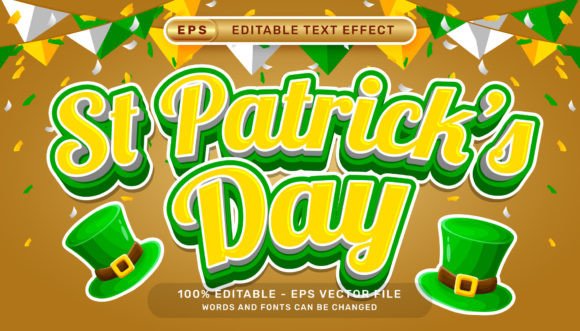
St Patrick's Day 3D Text Effect for Creative Designs
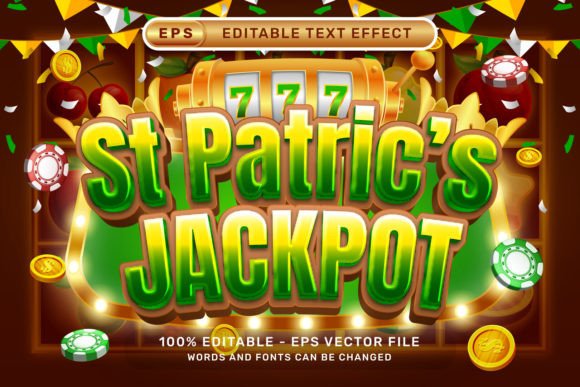
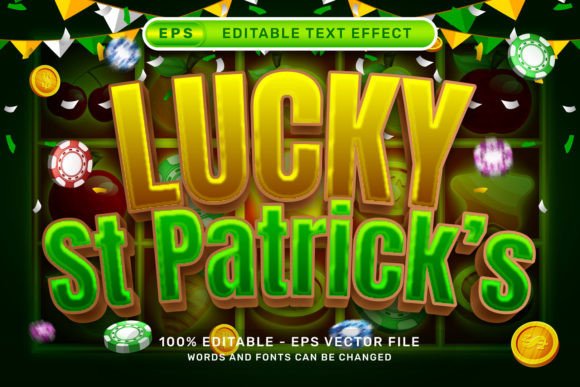
The St Patrick's Day 3D Text Effect is a versatile and easy-to-use design resource that brings festive charm and dimension to your creative projects. Whether you're a seasoned graphic designer, a small business owner, or someone looking to add a professional touch to holiday-themed content, this effect can help elevate your visuals without requiring advanced technical skills.
What is the St Patrick's Day 3D Text Effect?
This design asset is a pre-styled 3D text effect created specifically for Adobe Illustrator, featuring holiday-themed elements such as ribbon bows, balloons, and green accents associated with St Patrick's Day. The effect is delivered as an .EPS vector file, making it scalable without loss of quality, and includes a high-resolution .JPG preview (7000 x 4000 pixels) for quick reference.
With this effect, users can instantly apply a rich 3D appearance to any text by simply selecting the desired text and applying the effect via the Graphic Styles panel in Illustrator. No additional plugins, textures, or actions are needed, ensuring a seamless and user-friendly experience.
Key Features of the Effect
- Editable Text: Change the text content, font, or size without breaking the effect.
- Vector Format (.EPS): Ideal for scaling across print and digital media without quality loss.
- High-Resolution Preview (.JPG): Useful for presentations or mockups where vector files may not be supported.
- Festive Design Elements: Includes ribbon bows, balloons, and themed textures that reflect the spirit of St Patrick's Day.
- Compatibility: Works with standard Adobe Illustrator setups—no extra tools or plugins required.
Who Can Benefit from This Design Resource?
The St Patrick's Day 3D Text Effect is ideal for a wide range of users, including:
- Graphic Designers: Speed up design workflows by using pre-built effects for themed projects.
- Marketing Professionals: Create engaging social media posts, banners, and promotional materials for St Patrick’s Day campaigns.
- Small Business Owners: Design festive flyers, posters, or digital ads without hiring a professional designer.
- Content Creators: Enhance blog graphics, YouTube thumbnails, and newsletter headers with a holiday-themed look.
Where Can You Use the Effect?
This 3D text effect is highly adaptable and can be integrated into various types of visual content, such as:
- Social media posts for platforms like Instagram, Facebook, and Pinterest
- Printable flyers, posters, and event invitations
- Website banners and landing page headers
- Email marketing templates
- Promotional merchandise like t-shirts, mugs, and stickers
How to Use the St Patrick's Day 3D Text Effect
Using the effect is straightforward and does not require advanced Illustrator knowledge. Here's a simple guide:
- Open Adobe Illustrator and create a new document.
- Import the .EPS file into your project or load the Graphic Style into the Graphic Styles panel (Window > Graphic Styles).
- Type out your desired text using the Text Tool.
- Select the text and apply the St Patrick’s Day 3D Text Effect from the Graphic Styles panel.
- Edit the font, size, or color as needed to match your design vision.
Because the effect is fully editable, you can tweak individual layers or colors to better match your branding or creative direction.
Strengths and Limitations
Strengths:
- Quick and easy application of complex 3D effects
- High-quality vector format ensures scalability
- Perfect for time-sensitive holiday projects
- Compatible with standard Adobe Illustrator versions
Limitations:
- Requires Adobe Illustrator to fully edit and customize
- May not be suitable for users unfamiliar with Illustrator’s interface
- Design elements are themed, so may not be reusable for other holidays without modification
Real-World Applications and Examples
Here are a few practical examples of how the St Patrick's Day 3D Text Effect can be applied effectively:
- Event Promotion: Use the effect to design a vibrant poster for a local St Patrick’s Day parade or pub event.
- Retail Marketing: Create eye-catching digital banners for online stores promoting holiday sales.
- Community Flyers: Design engaging flyers for school or community events celebrating Irish culture.
- Social Media Graphics: Quickly produce themed Instagram stories or Facebook posts that stand out in feeds.
Evaluating Suitability for Your Project
When considering whether to use this effect, ask yourself the following questions:
- Do I need a high-quality, scalable text effect for print or digital use?
- Is the theme of my project aligned with St Patrick’s Day aesthetics?
- Do I have access to Adobe Illustrator or someone who can work with vector files?
- Am I looking for a time-saving design solution rather than building effects from scratch?
If the answer to most of these is “yes,” then the St Patrick's Day 3D Text Effect is likely a great fit for your needs.
Final Thoughts
The St Patrick's Day 3D Text Effect is a powerful and accessible design tool that simplifies the creation of festive, professional-quality text graphics. Its ease of use, compatibility with Adobe Illustrator, and thematic design elements make it a valuable asset for designers and non-designers alike. Whether you're creating holiday-themed marketing materials or simply want to add a touch of Irish charm to your designs, this effect offers a convenient and stylish solution.
Remember, the key to getting the most out of this effect is understanding your project needs and being comfortable with basic Adobe Illustrator tools. With a little creativity and the right resources, you can bring your St Patrick’s Day designs to life with minimal effort and maximum impact.