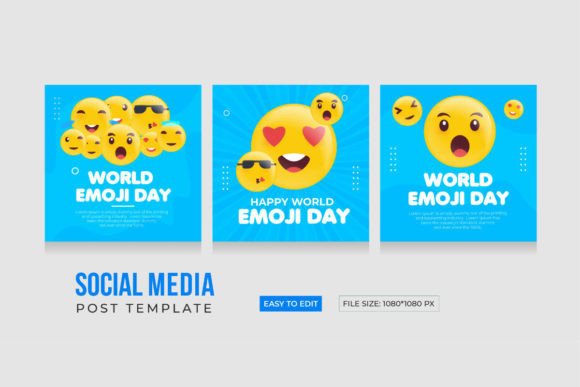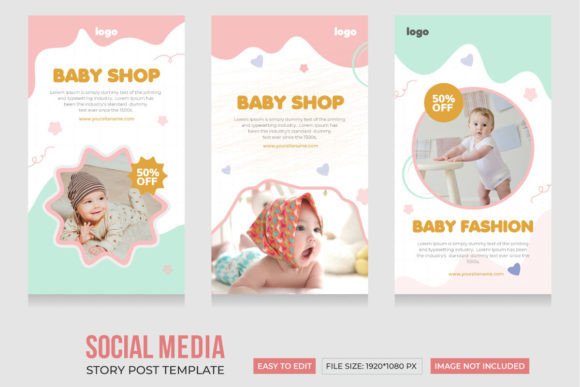
Creative Business Instagram Story Templates for Entrepreneurs
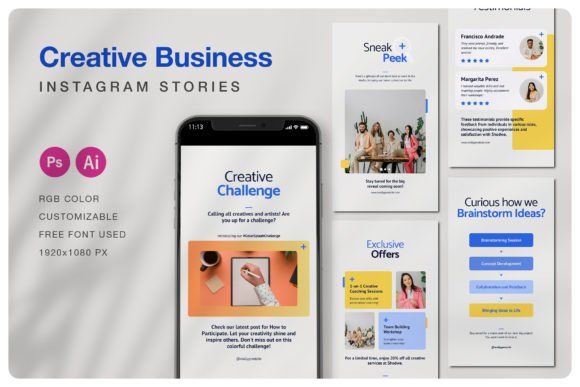
Running a small business or managing a personal brand on Instagram means staying visually consistent and engaging. One of the most effective ways to connect with your audience is through Instagram Stories, which are perfect for short, dynamic updates. However, creating eye-catching stories from scratch can be time-consuming, especially if you're not a designer. That's where the Creative Business Instagram Story Templates come in handy. These professionally designed templates are made for entrepreneurs, shop owners, and creatives who want to maintain a polished presence without the hassle.
What Are Creative Business Instagram Story Templates?
The Creative Business Instagram Story Templates are a set of five premium designs created using Adobe Photoshop and Illustrator. Each template is sized at 1080×1920 pixels — the perfect vertical format for Instagram Stories. The files are delivered as clearly layered and well-organized PSD, AI, and EPS files, making them compatible with most design software. Whether you're promoting a product, sharing behind-the-scenes content, or announcing a sale, these templates give you a head start with a professional layout.
Why These Templates Are a Smart Investment
If you're someone who wants your brand to look cohesive and visually appealing, these templates offer a fast and flexible solution. Here's what makes them valuable:
- Quick and easy to edit — No design experience needed thanks to smart objects and separate layers for images, text, and backgrounds.
- Professional and creative design — Each layout is modern and stylish, helping your brand stand out.
- Customizable color schemes — The templates come with a help file that guides you through changing colors using the color palette in Photoshop or Illustrator.
- High-resolution files — Designed in RGB color mode for crisp, vibrant visuals on mobile screens.
- Free fonts used — No need to purchase additional fonts to keep your design looking consistent.
How Can You Use These Templates?
These templates are versatile and can be adapted to many types of content. Here are a few realistic examples of how you might use them:
- Product Launches — Showcase your new items with clean, stylish layouts that highlight your branding and visuals.
- Promotions and Sales — Create urgency with bold text and vibrant colors that catch attention quickly.
- Behind-the-Scenes Content — Share your process, workspace, or team members in a way that feels authentic and visually appealing.
- Engagement Posts — Use templates to design interactive stories like polls, questions, or quizzes that invite your audience to participate.
- Business Tips and Tutorials — Share quick advice or how-tos using a clean, professional layout that builds trust with your audience.
Perfect for a Wide Range of Users
Whether you're a small business owner, an independent creator, a blogger, or a freelancer, these templates can help you maintain a consistent and professional look. Even if you're just starting out or don't have design experience, the templates are structured to make editing easy. The layers are clearly labeled, and you can replace images using smart objects — a simple double-click away.
Educators and coaches can use these templates to share daily tips, course announcements, or motivational messages. Retailers and online shop owners can highlight products, showcase customer reviews, or run limited-time offers. The multipurpose design means you can use the same set of templates across different areas of your business or brand.
Important Things to Know Before You Start
While the templates are incredibly useful, there are a few things to keep in mind before you dive in:
- Images in previews are not included — The photos you see in the preview mockups are for display only and are not part of the download. You'll need to add your own images or source them separately.
- Basic knowledge of Photoshop or Illustrator helps — While the templates are user-friendly, having a basic understanding of how to navigate the software will make the editing process smoother.
- Color changes are easy but require attention — The included help file gives step-by-step instructions on adjusting colors, but it's a good idea to preview your changes on mobile to ensure they look great in real-world conditions.
- Always test your stories — Before posting, preview your story on different devices to check for readability and visual appeal.
Getting the Most Out of Your Templates
To make the most of the Creative Business Instagram Story Templates, consider the following tips:
- Stick to your brand colors — Use the color palette instructions to customize the templates to match your existing brand identity.
- Keep text concise — Instagram Stories are fast-moving, so make sure your message is clear and easy to read within seconds.
- Use high-quality images — Since image placeholders are separate layers, replacing them with crisp, relevant photos makes a big difference.
- Repurpose templates for different goals — A layout designed for a product launch can easily be tweaked for a giveaway or event announcement.
- Update your stories regularly — Consistency builds familiarity, so use these templates to maintain a fresh and engaging presence on your profile.
Final Thoughts
The Creative Business Instagram Story Templates offer a smart, efficient way to elevate your social media presence. With their clean design, flexibility, and ease of customization, they’re a great resource for anyone looking to create professional-quality stories without spending hours designing from scratch. Whether you're promoting your business, sharing your journey, or connecting with your audience, these templates help you do it beautifully and consistently.