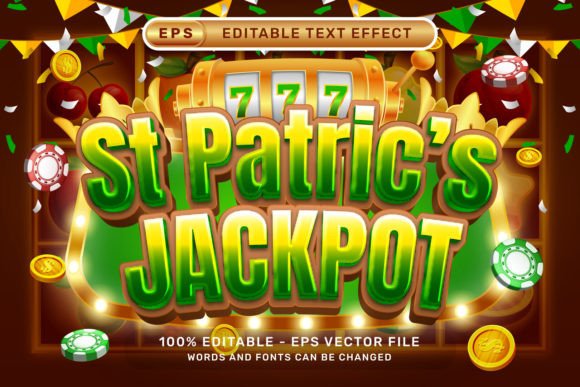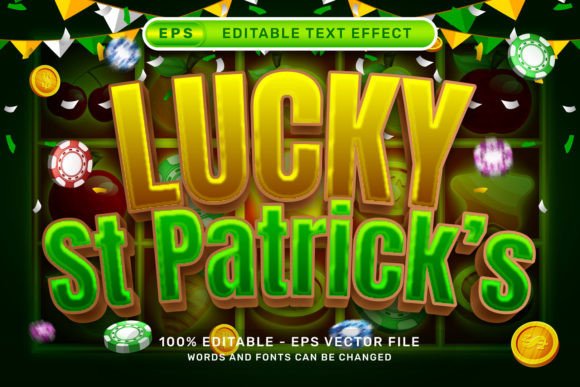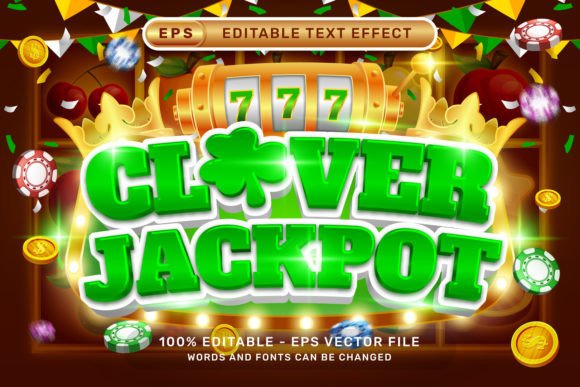
Clover Jackpot 3D Text Effect for Adobe Illustrator
The Clover Jackpot 3D Text Effect is a dynamic, ready-to-use design resource for Adobe Illustrator that transforms ordinary text into vibrant, dimensional typography. Designed with versatility in mind, this effect combines the festive energy of St. Patrick’s Day themes with the excitement of a jackpot celebration. Whether you're crafting a promotional banner, social media graphic, or event poster, this text effect adds instant visual impact without requiring advanced 3D modeling skills.
Built entirely in vector format using Adobe Illustrator's native 3D tools, the Clover Jackpot 3D Text Effect gives designers full control over text, color, and layout. No plugins or external actions are needed—just open the file, edit your text, and watch it come to life with pre-applied 3D depth, spin, and festive elements like ribbon bows, balloons, and clovers.
How It Works
Using the Clover Jackpot 3D Text Effect is as simple as selecting the text layer and typing your desired message. The effect automatically applies a 3D transformation, giving your text a polished, dimensional look. For more customization, designers can access the Graphic Styles panel under Window – Graphic Styles to tweak lighting, depth, and surface textures.
The package includes both an .EPS vector file for scalable editing and a high-resolution 7000 x 4000 px .jpg preview for quick visual reference. Because everything is layered and editable, you can easily adjust colors, swap out elements, or integrate the text into larger illustrations or branding materials.
Creative Possibilities
This effect is ideal for a variety of creative applications. Its St. Patrick’s Day and jackpot themes make it especially well-suited for seasonal promotions, Irish-themed events, and gaming-related designs. However, with a few tweaks, it can be adapted for broader uses.
- Event posters – Use the effect to highlight event names or taglines with a festive flair.
- Social media graphics – Create engaging posts for holidays or themed campaigns that stand out in feeds.
- Promotional banners – Whether for websites or printed materials, the 3D effect draws attention and adds professionalism.
- Merchandise design – Apply the text to t-shirts, mugs, or stickers with confidence that the vector format will scale cleanly.
Designers can also remove or modify the clovers, balloons, and ribbons to suit other themes. For example, swapping clovers for stars or hearts can transform the same text effect into a Fourth of July or Valentine’s Day design.
Who Can Use This and How
The Clover Jackpot 3D Text Effect is perfect for a wide range of users, from seasoned designers to small business owners looking to create polished visuals without hiring a professional. Here’s how different audiences can benefit:
Graphic Designers
Speed up your workflow by using the effect as a base, then customizing it to match a client’s brand or project style. Since everything is editable, you can fine-tune materials, lighting, and perspective to fit your vision.
Marketers & Business Owners
Create eye-catching promotional materials in minutes. Whether you're designing a holiday sale graphic or a themed landing page, this effect gives your text a premium look that stands out without requiring hours of design time.
Bloggers & Content Creators
Use the text effect to craft attention-grabbing headers, thumbnails, or infographic titles. The festive theme works especially well for seasonal content or lifestyle blogs focusing on celebrations and events.
Educators & Hobbyists
Learn how 3D effects are built in Illustrator by studying the layers and graphic styles used in the file. It's a great way to explore Adobe Illustrator's capabilities while creating something fun and visually appealing.
Design Tips for Best Results
While the Clover Jackpot 3D Text Effect is designed to be user-friendly, there are a few best practices to follow to ensure your final design looks clean and professional:
- Choose readable fonts – Even with a 3D effect, legibility is key. Avoid overly decorative fonts that may become hard to read once depth and shadows are applied.
- Match colors to your theme – The green and gold palette works great for St. Patrick’s Day, but don’t be afraid to recolor elements to fit your brand or occasion.
- Keep the layout balanced – If you're placing the text over a background, make sure there's enough contrast and spacing to let it stand out.
- Test across formats – Preview your design on different devices or print sizes to ensure the effect holds up in all intended formats.
Customizing the Effect
Because the Clover Jackpot 3D Text Effect is fully editable, you can easily personalize it to fit your specific project. Try these customizations:
- Swap elements – Replace clovers with other icons like stars, snowflakes, or flowers depending on your theme.
- Add background textures – While the file doesn’t require textures, adding a subtle paper or metallic background can enhance the 3D illusion.
- Experiment with lighting – Adjust the gradient and shadow settings to create different lighting angles or moods.
For advanced users, combining the effect with Illustrator’s 3D extrusion and bevel settings can create even more depth and realism, especially for print or packaging projects.
Why This Effect Stands Out
Many 3D text effects require complex setups, external plugins, or raster-based editing. The Clover Jackpot 3D Text Effect, however, is built entirely in Adobe Illustrator using native tools, making it lightweight, scalable, and easy to edit. There’s no need for special software or actions—just open the file and start customizing.
Additionally, the inclusion of both vector and high-res preview files ensures flexibility across different use cases. Whether you're preparing a design for print, web, or digital presentation, this effect adapts seamlessly without quality loss.
Final Thoughts
The Clover Jackpot 3D Text Effect is more than just a holiday-themed design tool—it's a versatile, professional-grade resource that simplifies the creation of polished 3D typography. Whether you're designing for fun, business, or learning, it offers a fast, flexible way to elevate your visual content. With its festive elements, easy customization, and compatibility with Adobe Illustrator, this effect is a valuable addition to any designer’s toolkit.